Cfobjectcache Docs Wrong? Inconceivable!
In this post I'm going to claim that part of the official documentation is wrong. Whenever I do this sort of thing I always think of the movie "The Princess Bride" when Enigo says "You kep using that word... I do na think it means what you think it means". Be that as it may, I think the docs in this case are ambiguous at best and at worse downright misleading. There's an obscure little tag called cfobjectcache that's available in ColdFusion server. Although it was a part of ColdFusion 5, I first became aware of this tag in Cf 8. You can find Adobe's documentation for the tag here. If you read the documentation (always a good idea - the muse is great but he doesn't write about everything) you may get the wrong idea about this tag. At the top of the documentation it says (and I quote), "Description: Flushes query cache". Well that's straightforward enough isn't it? This tag is designed to flush the cache of queries on the server. It's easy to use:
The catch
Ah... but a closer look at the attributes section of the live doc shows this explanation for the action of "clear". It states "clear: clears queries from the cache in the Application scope." This has led many folks to believe that cfobjectcache works at the application level. In other words, you can add it to code underneath a CFAPPLICATION tag or an Application.cfc file and it will surgically clear out any cached queries that "live" inside of that application.
So which is it? Does the tag clear the "global" query cache or just queries living in your application scope? A quick test will help us demonstrate.
The Setup
Here's a simple experiment. On your dev server create 2 folders. Put a cfm file in each of them. We'll call them App1 and App2. Here's the code for App1
<cfapplication name="app1">
<!--- cache a query - 30 minutes should do --->
<cfquery name="app1Qry" datasource="#mydsn#"
cachedwithin="#createTimespan(0,0,30,0)#">
SELECT TOP 10 *
FROM USERS
</cfquery>
<cfapplication name="app2">
<!--- cache a query - 30 minutes should do --->
<cfquery name="app2Qry" datasource="#mydsn#"
cachedwithin="#createTimespan(0,0,30,0)#">
SELECT TOP 10 *
FROM USERS
</cfquery>
So you have created 2 cached queries in 2 separate applications - so far so good. Let's take a look at server monitor. Don't worry we'll keep it simple. Open the "statistics" tab in server monitor, then the database menu (on the left) and finally open the query cache status. You should see a cached query count of 2 if you are running on a dev server with nothing else going on (like on your local desktop for example).
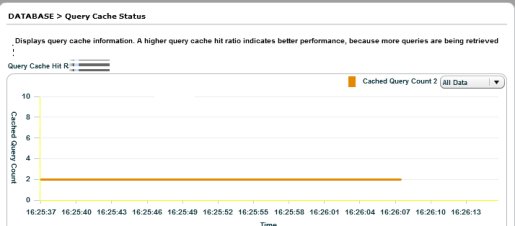
If you have memory tracking enabled - which you should never ever ever have enabled by default on production (Ever!) you may also see a cache size of a few k. Just keep that screen up and notice that you have 2 queries "in the cache". It's time to experiment with our cfobjectcache tag. Open your page with the app1 query and comment out the cfquery tag. Then add this:
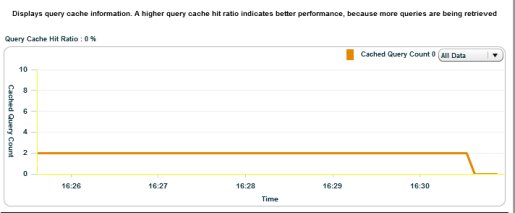
Other versions of this experiment yield the same result. Executing the tag inside or outside of an application has no effect. No matter the conditions the tag will always clear the entire query cache at the server level.
Why Worry
Why is this important? If you are on a server with other sites and you choose to use this tag because it has been left enabled (and it often is left enabled because it is so obscure) you are eliminating the cached queries of every site on the server. On a busy shared server this could result in a serious degradation of service as well as sudden unexplained DB activity as sites churn away re-caching queries. In fact, on newer 64 bit servers with very large heap sizes query caching is a more viable option, but that also means that folks might be loading up a lot more data into the cache than in previous memory constrained 32 bit versions. So If you use the tag it should probably only be on a server which you control and not on a shared server. If you are a server admin who enables and uses sandboxes for shared servers you should probably disable this tag for virtually all users on the server.
Still, it is useful to have an easy way to quash the entire query cache on a dedicated server. Like most things in life, you simply need to handle with care.
2 Comments
-
 The docs (http://livedocs.adobe.com/coldfusion/8/htmldocs/he...) don't seem to give the indication that cachedwithin caches queries only relative to the current application scope. The docs say: "To use cached data, current query must use same SQL statement, data source, query name, user name, password."
 -
 @Justice,
You are quite right. But the docs for cfobjectcache DO seem to indicate that the clearing of the cache is somehow related to the application scope. That's where the confusion lies.
Sites to Watch
Aggregators



RSS
